


Pura
4.41.67K Reviews
App Specs
- Version
- 3.14.2 (0)
- Updated On
- License
- Free
- Downloads
- 100,000+
- Developer
- Pura
- Categories
- House & Home
- Platform
- Android, iOS
Screenshots
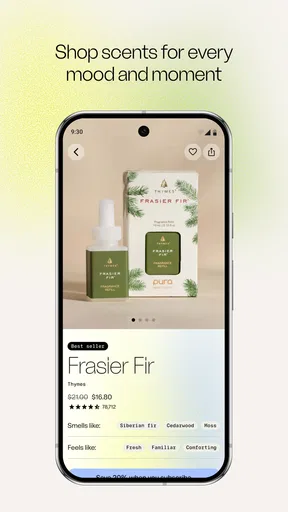
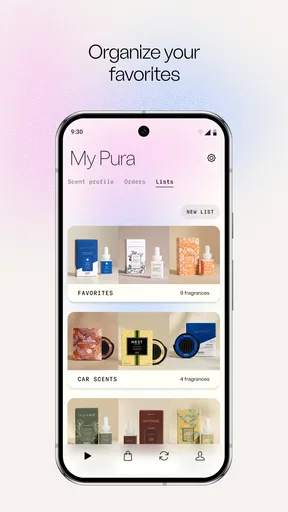


 Analysis by AppCompare
I tend to think of home fragrance as something you set and forget: choose a candle, light it, and accept that it will keep going until you put it out. Pura takes a more controlled approach, using a phone app to manage scent in the home and car. The important distinction is that the app is a companion to Pura’s fragrance hardware, not a standalone way to scent a room. If you already like the idea of a connected diffuser, it gives you more ways to shape when and how fragrance is used.
What you get without paying for the app
The app is free, which makes trying its controls less of a commitment than buying into a paid app subscription from the outset. Pura, the developer, has kept the product focused on managing fragrance and atmosphere rather than turning it into a general home-control dashboard. The app has a 4.4 average from around 3,400 ratings, and it has been installed over 100,000 times. Those figures suggest a well-established audience, though they don’t tell me whether a particular scent or device will suit your home.
The key budget question is not just whether the app costs anything to install; it is whether you want the related hardware and ongoing fragrance supplies. Free access to the app does not mean the complete scent setup is free. I would treat the app as the control layer for a product you need to choose and maintain, not as a no-cost replacement for candles, sprays, or passive air fresheners. That difference matters if you are comparing total household spending.
Where the control can earn its place
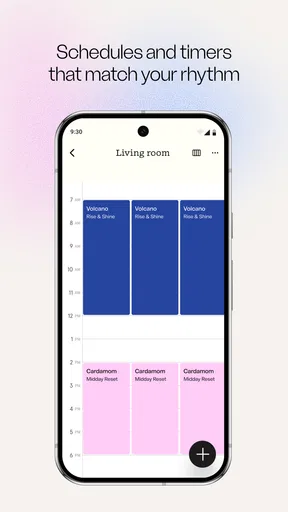
For me, the useful promise is consistency with less daily fiddling. A fragrance schedule can make a room feel different at predictable points in the day, while adjustable intensity gives you a way to avoid treating every room as though it needs the same strength. That is a more thoughtful approach than leaving a strong scent running continuously. It can also help when you want a welcoming smell before guests arrive but prefer a quieter atmosphere the rest of the time.
A practical example: imagine coming home after work to a living room that has been kept neutral while you were out, then setting a mild fragrance for the time you usually relax. The benefit is not simply that a scent is available; it is that you can decide when it belongs in your routine. I’d start with a restrained intensity and a short schedule, then adjust after living with it for a few days. That makes it easier to tell whether a scent is genuinely pleasant over time or only appealing in a brief first impression.
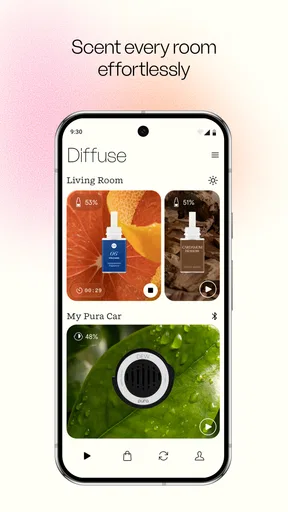
Car use is another reason the app may be more useful than a conventional home-only fragrance routine. If you want a similar sense of control in both places, having the app cover home and car makes the idea feel more coherent. I would still think about the spaces separately: a scent that feels gentle in a large living room can seem much more noticeable in a compact car. The sensible move is to begin conservatively rather than assume one setting will feel right everywhere.
How it fits into a real fragrance routine
One advantage of managing fragrance through an app is that it gives you a reason to plan around the room, not just the fragrance itself. A kitchen, bedroom, and car have different uses and different tolerances for scent. Rather than choosing one strong setting for the whole day, I’d use separate routines where the hardware and app allow, keeping the bedroom especially subtle and reserving more noticeable fragrance for a shared living space. This kind of restraint is a practical way to make a scent feel intentional instead of ever-present.
Worth Reading Before You Choose

EA SPORTS FC Mobile 26 Is a Bigger Football Game, but It Takes Time

Flipboard Shows What News Apps Must Do Beyond the Feed

Switching to Android Auto Means Rethinking Your Driving Routine

Google Calendar Makes a Crowded Week Easier to Manage

Ludo King Makes the Most of the Minutes Between Plans

Baby Panda World Brings Quick Play to Modern Phones, but Its Game Library Feels Busy
Small decisions that make the setup more useful
A good first step is to avoid changing several things at once. Choose one fragrance, start at a low intensity, and observe how it feels during the time you actually spend in that room. If the scent seems too strong, reduce the intensity before deciding that the fragrance itself is a poor match. If it fades into the background, consider whether the room is large, whether you are spending less time there than expected, or whether a different schedule would be more useful. This simple trial-and-adjust approach is more informative than switching scents repeatedly.
I’d also think about scent transitions. If you schedule one fragrance for the morning and another for the evening, make sure you genuinely want the room to change character twice a day. Some people will enjoy a fresh start to the day and a calmer evening; others may find that one consistent scent is less distracting. The app’s scheduling is most valuable when it reflects an actual routine, not when it becomes a reason to keep tweaking settings for novelty.
Usage notifications can help you notice when a fragrance cartridge may need attention, but they are best treated as a prompt to check rather than a substitute for paying attention to the room. How quickly a fragrance seems to run down can depend on the intensity and schedule you choose. If you want to stretch supplies, it makes sense to use fragrance only when you are home or when a room is likely to benefit, rather than keeping a schedule running out of habit.
How it compares with simpler options
A candle is the more direct choice if you like the ritual of lighting it, want to see the flame, and don’t mind remembering to extinguish it. A room spray is usually a better fit when you only need a quick burst before visitors arrive and have no interest in schedules or connected controls. Passive air fresheners ask for very little attention, but they also offer less ability to decide when a scent is active. Pura sits on the more managed end of that spectrum: its appeal is control and routine, not simply making fragrance available.
That extra control comes with a trade-off. A conventional candle or spray does not ask you to pair an app with a compatible device, learn a new interface, or build a connected routine. If you already use smart-home controls and enjoy setting up small automations, Pura’s approach is easier to justify. If you prefer products that work immediately without an app, a traditional option may be a better match even if it gives you fewer adjustments.
Voice control can be useful when your phone is across the room or your hands are occupied, and support for Alexa and Google Home gives people using those systems another way to make a quick change. I would view that as a convenience, not the main reason to choose the product. The app remains the place to manage the fragrance experience, while a voice command is most helpful for simple, immediate actions such as changing a setting or switching the diffuser off.
Who is likely to get the most value
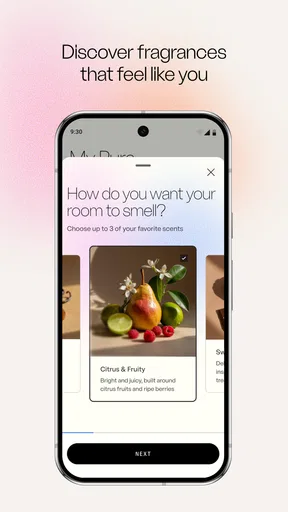
I can see the app being a good fit for someone who already uses Pura hardware or is deliberately considering a smart fragrance setup. It is especially appealing if you like routines, want different moods at different times, or value being able to adjust intensity rather than relying on a fixed-output air freshener. It may also suit people who enjoy comparing fragrance descriptions and trying combinations, provided they are comfortable spending time choosing what works in each space.
It is less compelling for someone who rarely uses fragrance, dislikes scented products in general, or just wants the cheapest and simplest way to freshen a room. It may also be the wrong choice if you don’t want another connected device to manage. A free app can be easy to download, but the value depends on whether you will use the hardware and keep a fragrance routine going. If you only want an occasional scent, a basic spray or candle is likely to involve less setup.
Households should also consider different preferences before setting a shared room to a strong scent. What feels cozy to one person can be distracting to another, so I’d treat low intensity as the courteous starting point and make changes after everyone has had a chance to experience it. This is a small but important distinction: the app can give you finer control, but it cannot decide what the people sharing the space will find comfortable.
Compatibility, age, and day-to-day expectations
The app is rated for Everyone and is available for devices running Android 7.1 or later. Its current version is 3.13.1 (0), and the app’s release date was July 26, 2017. Those details make it easier to check basic compatibility before installing, especially if you use an older phone. I’d still make sure your device and the Pura hardware you intend to use are a sensible match before building your routine around them.
One question people often have is whether installing the app alone will produce fragrance. It will not replace the diffuser: the app is intended to control Pura’s scent hardware. Another is whether the system can be used without voice assistants. Alexa and Google Home integration is an option for supported smart-home users, but the app is the central part of the experience, so voice control is not the only reason to consider it.
It is also worth deciding how much management you want from a fragrance product. Pura’s controls and scheduling can make a routine more precise, but they introduce setup and ongoing choices that a passive freshener avoids. If you enjoy adjusting your home environment from your phone, that is a fair exchange. If you want fragrance to be completely hands-off, the connected approach may feel like unnecessary work.
My verdict on the value
I would recommend Pura to someone who wants more say over how fragrance fits into daily life and is already interested in the compatible hardware. The free app is a low-risk way to explore the control experience, but it should not be mistaken for the total cost of using the system. The value is in the ability to tailor timing and intensity, especially if you will use those controls regularly in more than one setting.
I would skip it if your goal is simply to make a room smell pleasant now and then, or if you would rather avoid connected devices and fragrance supplies. In that case, a candle, spray, or passive freshener is more straightforward. For someone who likes a carefully managed home atmosphere, though, the app offers a practical middle ground between a fixed scent product and constantly handling fragrance by hand. My advice is to begin with one room, a light setting, and a realistic schedule; if that small routine genuinely improves the space, the app is doing something useful.
If you’ve ever wished for a more immersive and personalized fragrance experience in your home, Pura might just be the app you need. This clever little app is all about bringing smart home technology to your olfactory senses. I recently gave it a whirl, and here's what I discovered.
Getting Started with Pura
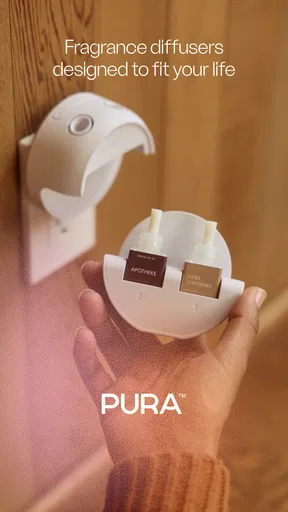
Right off the bat, setting up Pura is a breeze. You simply download the app from the Play Store or App Store, and you're off to the races. The app pairs with the Pura smart diffuser, which is a sleek, attractive device that fits nicely into any room. I was impressed by how easy the initial setup was. Just plug in the diffuser, open the app, and follow the on-screen instructions. Within minutes, my home was ready to smell like a high-end boutique.
Exploring the Features
The app itself is packed with features that are both fun and functional. One of my favorites is the ability to schedule different scents at various times. I set it so that my living room had a refreshing citrus scent in the morning to help wake me up, and a calming lavender aroma in the evening to help me unwind. The app allows you to control the intensity of the fragrance, which is perfect if you prefer a subtle scent over something more powerful.
Another cool feature is the integration with smart home systems. If you're into the whole smart home ecosystem, you'll be pleased to know that Pura works with Alexa and Google Home. I found it pretty nifty to be able to change scents or turn the diffuser on or off using just my voice.
Personalization and Customization
One of the things that make Pura stand out is the level of personalization it offers. You can mix and match different fragrance cartridges to create a bespoke scent profile for your space. The app provides detailed descriptions of each scent, which made selecting my favorites a fun experience. I ended up with a delightful blend of eucalyptus and peppermint for the bathroom—talk about a spa-like atmosphere!
The app also keeps track of your fragrance usage, sending you notifications when it's time to replace a cartridge. This feature ensures you’re never caught off guard with an empty diffuser, which I found incredibly handy.
Usability and Design
The design of the app is clean and intuitive. Navigating through the various options is straightforward, even for someone who might not be tech-savvy. The interface is visually appealing, with vibrant images of the scents and clear labeling of all the controls. As someone who appreciates good design, this was a big plus for me.
In terms of usability, the app performed smoothly without any hiccups. I didn't encounter any bugs or crashes during my time using it, which is always a relief when dealing with smart home tech.
Final Thoughts
Overall, my experience with the app was overwhelmingly positive. It makes managing home fragrances incredibly easy and adds a layer of customization that I haven't seen elsewhere. Whether you're a fragrance aficionado or just someone looking to enhance their home environment, this app is worth checking out.
With its user-friendly interface, smart home integration, and a wide range of customizable scent options, Pura provides a unique and enjoyable way to freshen up your space. So, if you're ready to elevate your home ambiance game, give it a try. You might just find your next favorite scent combo!
Pros
- Intuitive interface
- easy to navigate.
- Wide variety of scents available.
- Customizable scent schedules.
- Compact and stylish design.
- App integrates seamlessly with smart home devices.
Cons
- Requires constant Wi-Fi connection.
- Limited free features
- subscription needed.
- Initial setup can be confusing.
- Battery life could be improved.
- Scent cartridges can be pricey.
FAQs for Pura
What is Pura, and what does it offer?
Pura is a smart home fragrance diffuser app designed to enhance your living space with customizable scents. It offers a wide variety of fragrances that can be scheduled and controlled from your smartphone. The app allows for personalized scenting experiences and integrates with smart home systems for seamless automation.
How do I set up and connect my Pura device?
Setting up your Pura device is straightforward. Begin by downloading the Pura app from the App Store or Google Play. Follow the in-app instructions to connect the device to your Wi-Fi network. The app will guide you through pairing the device and selecting your preferred fragrances for a personalized experience.
Can I control multiple Pura devices with one app?
Yes, the Pura app allows you to control multiple devices from a single account. Each device can be individually managed, letting you customize the fragrance settings for different rooms or spaces. This feature is perfect for users looking to create diverse scent atmospheres in their home.
Are there any ongoing costs associated with using Pura?
While the app itself is free, users will need to purchase fragrance cartridges for the Pura diffuser. These cartridges vary in price depending on the scent and brand. Additionally, subscribing to Pura’s fragrance plans can offer cost-saving benefits and ensure you always have your favorite scents on hand.
Is the Pura app compatible with smart home systems?
Yes, the Pura app is compatible with several smart home systems, including Amazon Alexa and Google Assistant. This integration allows you to control your diffuser with voice commands and automate your fragrance settings alongside other smart home devices, enhancing convenience and functionality.


